
Agentic engineering, in practice
I run this studio with Build Studio, a system that coordinates specialised AI agents around a written spec. I call that agentic engineering: deciding what to build, making the work reviewable, and checking the result. This page shows the thinking behind it, the loop I use, and the dashboard that keeps the work visible.
> execution: lean
  ↳ test writer: tests from the PRD
  ↳ builder: implementation
  ↳ review: tests, code, security
  ↳ owner: review before release_
Watch a full run
One user story, start to finish: a draft PRD taken through review and execution in Build Studio, ending in a merged change. This earlier recording shows the longer workflow; the lean execution described below is now the default.
Why I work this way
The workflow starts with a simple idea: make the intent clear, let agents do focused work, and keep decisions and results open to review. This video explains the thinking behind working in Build Studio.
The loop I run
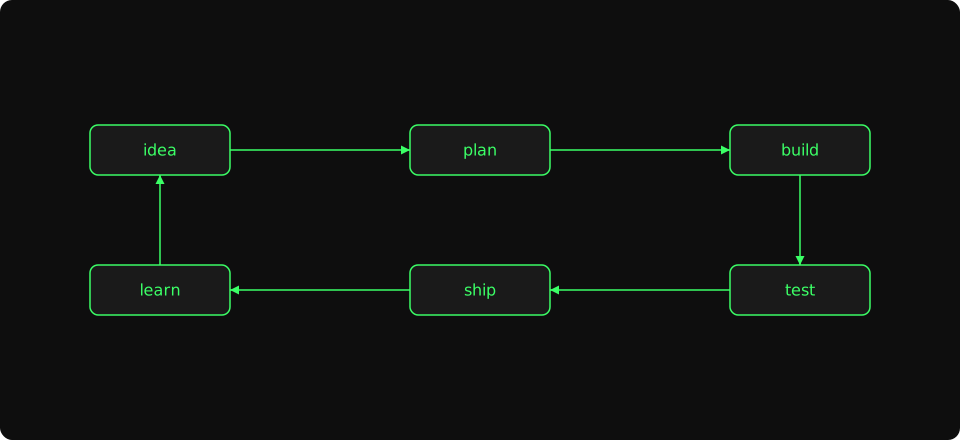
- idea
- Where every PRD starts. A line in
vision.md, a row in the backlog, or something the build log surfaced last week. - plan
- I write a small disposable PRD — short enough to read in one sitting, small enough to discard if it isn't good enough. Reviewer agents run in parallel and the PRD ships when their feedback is addressed.
- build
- A test writer creates tests from the PRD before implementation. One builder runs the work and can delegate parts to implementer agents.
- test
- A review step runs the test suites and checks the code, including security. Findings feed into fix rounds before I approve the result.
- ship
- I approve the release. The backlog item closes, the build log records what shipped, and decisions worth keeping go into docs/decisions.md.
- learn
- Lessons from the round feed back into vision and the backlog. The next idea inherits what this one taught — that's why it's a loop, not a checklist.
The PRD lifecycle
Vision and roadmap
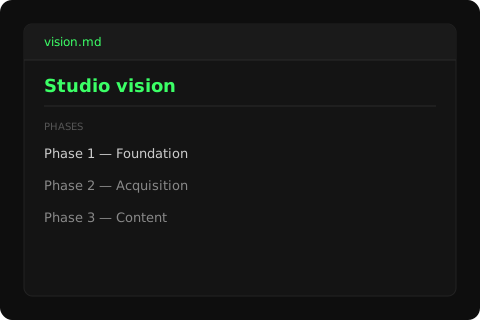
I write a single vision document with a high-level roadmap divided into phases. The vision is the long-running source of truth — it changes when the studio learns something that should change it, and the roadmap re-orders behind it. Everything else on the workflow side ladders to whatever the current phase is.
The visual below is a sanitized excerpt of the actual vision.md — same shape, demo text. The dashboard tour below shows what the live document looks like inside the project view's overview tab.
PRDs as the unit of work
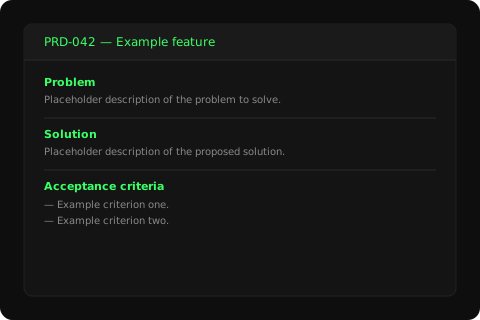
The starting point is a task or story in the backlog. The dashboard drafts it into a small PRD with the companion specs the work needs. That makes the intent concrete enough to review before implementation. A Bug item takes a shorter route straight to a focused build and review.
The visual below is a thumbnail of a PRD file — sanitized header, demo body text. Real PRDs live in docs/prds/ and are linked from the project's status surface; the dashboard tour shows where they appear in the project view.
Review and execution rounds
Feature work passes through three phases. Preparation reviews the PRD and produces any required copy, UX, or architecture specs. Design happens when the work needs visual design before code. Execution defaults to a lean chain: a builder coordinates tests written before code, implementation, and a review that covers tests, code, and security.
For riskier stories, I can choose Full, which keeps the longer sequence of specialist checks. The strip below shows the usual phases; the run history makes each review and fix round visible.
The dashboard
Build Studio is the studio's operating system and is available as open source. Its four functions are Project, Development, Operations, and Support. The screenshots below show the current app, from the project backlog to model choices, review, execution, and release.
Project
Project is the top-level container. Each project has a vision, a roadmap, a backlog, and a folder of PRDs — the dashboard reads those files directly so the workflow tracks the source of truth, not a copy of it.
Models and usage
Choose the CLI and model for Plan & specify, Build, and Review & verify. Claude Code uses Claude models, Codex uses OpenAI models, and OpenCode gives access to OpenRouter and other providers. The same view shows account usage limits, reset times, and remaining OpenRouter credits.
Development
Development is where review, build, and fix rounds happen. One builder coordinates lean execution and can delegate implementation work. Choose Claude Code, Codex, or OpenCode and a model for each step group. Each run has a scorecard showing cost and time per step, including subagents.
Operations
Operations is the workflow's other half: services, CI/CD, and runbooks for everything the studio runs in production. Most PRDs touch one tab here at the end of execution.
Build → Launch
Build Studio turns a written spec into reviewed software. Marketing work has moved into Launch Studio, a separate product currently in development. The two are intended to work together: build the product, then plan and run its launch.
Support
Support is where incidents, customer reports, and documentation gaps from live products are triaged into backlog items. A Bug item can continue through the short build-and-review workflow, with the outcome tracked against the report.
Inside Build Studio
The tour above shows what Build Studio looks like. This section is for the wiring underneath — the parts that earn their keep but don't show up in screenshots. Six pieces hold the loop together.
tmux sessions and git worktrees
Each run has a dedicated tmux session. The builder works on the run's branch in the project checkout; worktrees isolate the test-writing step and parallel fix tasks. Reviewers work in the project root. Cleanup releases dev-server ports so later rounds can start cleanly.
Memory between agents
Structured feedback is stored by round, step, and role. Later agents receive the last three rounds, capped at 500 characters per entry. On a re-review, a reviewer sees its own earlier findings and the fixes, keeping the check focused. This feedback stays within the run; reusable lessons are handled separately.
Context budget per agent
The context window depends on the selected model. Build Studio keeps prompts focused on the task and filters learnings by relevance and the project's stack. At most six learnings enter a prompt, each capped at 250 characters. The guidance is advisory: do the primary task first, report clearly, and stop when blocked.
Agent definitions and per-project overrides
Presets give projects a starting roster and workflow: web-app, api-only, mobile-app, static-site, fast-track, and solo. Project configuration can override the preset. Lean is an execution chain, rather than a project preset.
Learnings across rounds
Learning capture runs by default after runs that needed fixes. Lessons can be reused across project-local, cross-project, and built-in collections, filtered for the next task. Agents report which learnings they applied, and lessons that are never used are archived. The aim is to reduce repeated mistakes; that benefit still needs to be measured.
Models per step
The Model page has three step groups: Plan & specify, Build, and Review & verify. Each gets a CLI and model, so planning, implementation, and verification can use different combinations. Claude Code, Codex, and OpenCode are supported; OpenCode also opens the choice to OpenRouter and other model providers.
Open source
Build Studio is available now under the Apache 2.0 license. The repository includes the multi-project hub, project onboarding and scaffolding, review and execution workflows, bundled agent roles, CLI, and the macOS Electron app. I use this same code to run the studio; publishing it makes the workflow inspectable and gives other builders somewhere concrete to report issues, suggest improvements, or adapt it for their own projects.